IG Comment Bot - Instagram Auto Comment Tool
Automatically comment on Instagram posts by post links, hashtag, location, or a custom user list. Put your account in front of the people you actually want to reach, and gain more followers.
5 / 5 stars
Running in 3 steps
- Create a comment list. We ship one ready to use.
- Create a bot, pick a target, and select your comment list.
- Hit run. The bot comments while you do something else.
The best comment bot for Instagram
Engage with your target audience through comments, on autopilot.
Features
We provide many features you can use.
- Comment by Post Links: paste the links or upload a CSV, and comment on exactly the posts you picked.
- Comment by Hashtag: reach the people already posting about your niche.
- Comment by Location: target posts from a specific place or venue.
- Comment Custom Users: paste a username list and comment on their latest posts.
- Comment a User's Followers or Followings: borrow a competitor's audience.
- Randomized comment lists so every post gets a different message.
- Custom placeholders such as the post owner's username.
- Spin syntax supported for endless comment variations.
- Pause and continue anytime, with the bot picking up where it left off.
- Export your comment history to CSV with the reason for any that failed.
Pricing
Get started for free. No card required, cancel anytime.
100% MONEY-BACK GUARANTEE
We know you'll love our professional services, but let us prove it. If our service hasn't exceeded your expectations after 7 days, you'll get a full refund. Simple as that.
FAQ
How do I get started?
- Create a comment list. We have already created one for you.
- Create a bot, choose a target, and select your comment list.
- Run the bot. That is all there is to it.
How to comment on specific posts?
Choose Comment by Post Links when creating a bot, then give it the posts in either of these ways:
- Paste the post links, one per line or separated by commas. Links to posts, reels and IGTV all work.
- Upload a CSV with a Post URL column. This is the same column name IG Post Export writes, so an exported file can be used as is.
Duplicate links are removed before the bot starts, so each post is commented on once. If a post has comments turned off or has been deleted, the bot skips it and records the reason, which you can review in the comment history or export to CSV.
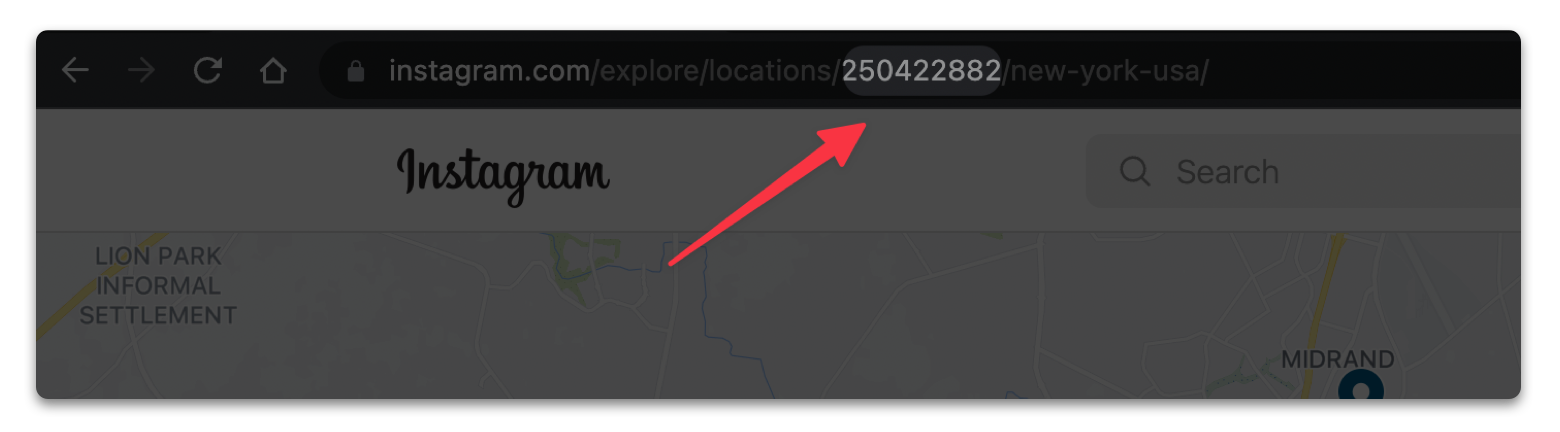
How to find Instagram location Id?
Instagram has removed the Places tab from search, so typing a place name into the search bar no longer takes you to its location page. Two routes still work:
-
Open any post tagged with the place you want and click the location name shown above the post. That opens the location page.
Alternatively, search Google for site:instagram.com/explore/locations "your place name" and open the result. -
On the location page the Instagram location ID is a numeric part of the URL
What is the difference between a Free account and a Pro account?
- Free account can post up to 10 comments per day.
- Pro account can post unlimited comments per day and gets premium support.
How do placeholders and spin syntax work?
Placeholders are replaced at comment time, so you can greet the post owner by username instead of sending the same line to everybody. Spin syntax lets you write one comment with several alternatives, and the bot picks one at random for each post. Combine both and the same comment list produces a different message every time.
What are the limits of Instagram?
Instagram (not IG Comment Bot) limits the number of web requests in any given time period. Their limits are not exactly known, may change at any time, and will vary from account to account.
There are four main types of restrictions:
- A 429 limit is very common. It usually takes between 1 and 15 minutes to clear.
- A 400 restriction is occasionally hit and usually requires a simple account verification to be completed and restored.
- A soft restriction is occasionally hit and usually lasts about 10 minutes, after which it can be restored.
- Hard restrictions occur less frequently but last longer, usually at least 12 hours, sometimes up to 48 hours.
Why does the bot not work after restarting the browser?
If the bot was running when you restarted your browser, click the pause button to PAUSE the bot first, then click the CONTINUE button to let the bot carry on.
Why does the extension not work?
Please first confirm there is no spelling error in the username or hashtag.
Then visit instagram.com to check whether Instagram is asking you for verification.
We may also have released a new version recently, and the extension update mechanism can occasionally fail.
Reinstalling the extension usually brings it back to normal.
Feel free to contact us at convertscc@gmail.com if you have any questions.
Why is it not responding when I use Google login?
You can wait a little longer, or switch networks or restart the browser and try again.
I have paid for the subscription but I do not get the Pro version. Why?
The billing email and login email might be different. Please make sure you log in with the same email used for billing.
If the issue persists, contact us at convertscc@gmail.com.
How to cancel my subscription?
You can cancel your premium subscription at any time by clicking the PRO button, and then clicking the CANCEL SUBSCRIPTION button.
Please feel free to contact us at convertscc@gmail.com if you have any questions about your subscription.